

Cherax and Stand are the two GTA 5 mod menus our customers buy most. Neither is better for everyone: they’re built for different setups. Prices on this page are live, straight from our store and in your currency.
The short answer
- Choose Cherax if you play GTA V Enhanced, or both editions. Also if you want unlocks and recovery built into every tier, or a route to sessions with BattlEye on through Cherax Prime (invite-only).
- Choose Stand if you play GTA V Legacy, in solo sessions with BattlEye off. Also if you want to run ASI mods next to Lua scripts, or drive it from a web interface.
- On a par: both protect you against crash and kick attempts from other modders, both run Lua scripts, both work next to other menus, both sell lifetime keys with upgrades, and both need Windows 10 or 11.
Cherax and Stand side by side
| Cherax | Stand | |
|---|---|---|
| GTA V edition | Legacy and Enhanced, on every tier | Legacy only |
| BattlEye | Standard and Premium: not made for it. Prime: made to run with BattlEye on | Solo sessions with BattlEye off |
| Tiers | Standard and Premium (lifetime), Prime (1, 3 or 6 months, invite-only) | Basic, Regular and Ultimate (all lifetime) |
| Prices | Standard € 23.50, Premium € 46.00, Prime from € 27.50 1 Month | Basic € 12.00, Regular € 24.50, Ultimate € 48.00 |
| Upgrades | Standard to Premium, € 23.50 | Basic to Regular € 12.00, Regular to Ultimate € 24.50, Basic to Ultimate € 37.00 |
| Scripting | Built-in Lua engine with an editor and the API docs beside it | Lua scripts and ASI mods |
| Interface | Click GUI or List GUI, controller support, community translations | Command box, web interface you can open in a browser, even on a phone, fully translated |
| Protections | Blocks crash and kick attempts from other modders, filters chat and bounty spam | Protections against kicks and crashes, designed not to break the game |
| Unlocks and recovery | Unlock All on every tier. Premium adds Free Shopping, money and RP drops, GTA+ unlock | Stand’s support answers this directly |
| Works next to other menus | Yes | Yes, Stand is known for co-loading with other menus |
| One PC or several | Standard and Premium aren’t locked to one PC. Prime is | One key for one PC, no sharing |
| Free version | No | Yes, a free edition on Stand’s own website, handy to try the menu |
| Where you redeem your key | cherax.menu | stand.sh |
Cherax plans and prices Stand plans and prices
GTA V edition: check this first
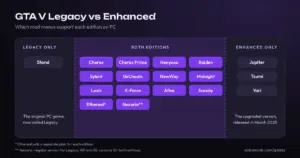
This is the difference that settles most cases. Cherax runs on GTA V Legacy and GTA V Enhanced, whichever tier you buy. Stand supports GTA V Legacy only. If you play Enhanced, or moved your GTA Online character there, Stand isn’t an option today.
Not sure which edition you have? Our guide to GTA V Legacy vs Enhanced explains how to tell, and which other menus support each one.
Where you play: BattlEye and sessions
GTA Online on PC runs the BattlEye anti-cheat. Stand’s product page is plain about it: Stand is for solo sessions with BattlEye off.
Cherax Standard and Premium aren’t made for BattlEye either. Cherax Prime is the tier that is: it includes every Premium feature and is made to run with BattlEye on. It’s invite-only. You need an invite from a Prime user, which gives your Cherax account the Prime Buy Perk role for a limited time, and that’s when you can buy a Prime key. Prime is a 1, 3 or 6 month subscription, locked to one PC. Without an invite, don’t buy it.
A straight word on bans. Cherax, Stand and every other mod menu break Rockstar’s terms when you use them in GTA Online, and any of them can get your account banned. Nobody can honestly promise you won’t be banned, and we don’t.
Tiers, prices and upgrades
Cherax has two lifetime tiers. Standard is the core menu: protections, the vehicle spawner, kicks, Advertise Session, Lua, Unlock All and Hulk Mode. Premium adds Free Shopping for vehicles, properties, weapons and upgrades, money and RP drops, the GTA+ unlock, traffic variety and Convert Vehicle to PV. Starting on Standard and upgrading later costs € 47.00 in total, against € 46.00 for Premium outright. The upgrade key only works on a Cherax account that already holds Standard.
Stand has three lifetime tiers: Basic, Regular and Ultimate. Regular includes the option to hide your session, and Ultimate adds everything in Regular plus a session browser, a session scripts manager, player tracking, Block All Joins and other session controls. Stand’s website lists what each edition includes, and for questions about unlocks and recovery, Stand’s support answers directly. Going from Basic to Regular with an upgrade costs € 24.00 in total, against € 24.50 for Regular outright.
Whichever you choose, a lifetime key works for as long as the developer keeps the menu going. Both are long-running menus: Cherax’s developers have worked on it since 2019, and Stand has been around for years too.
Scripting, interface and extras
Cherax gives you two layouts: a Click GUI you drive with the mouse and the classic List GUI, both themeable, with controller support and community translations. Its built-in Lua editor shows the API docs beside your code and runs community scripts. You also get hotkeys, favourites, a Streamer Mode for when you record, and Rockstar ID tools such as recent players, online alerts and a session finder. Cherax is an internal menu, and it works next to other menus.

Stand runs Lua scripts and ASI mods (plugins made for GTA V by the modding community), so you can add features from both worlds. You can type commands in its command box, or open its web interface in a browser, even on your phone. It also has augmented reality features in the game, such as world hacking and AR beacons, and it’s known for loading alongside other menus. A Stand key is for one PC and can’t be shared, like most menus.

Who should pick Cherax
- You play GTA V Enhanced, or switch between both editions.
- You want unlocks on every tier, and Free Shopping and drops with Premium.
- You’d like the option of Cherax Prime for sessions with BattlEye on, if you get an invite.
- You want to choose between a click interface and a classic list menu.
- You want to buy from an official seller: Cherax only supports keys bought from the resellers it lists, and EldroMods is on that list.
Who should pick Stand
- You play GTA V Legacy, in solo sessions.
- You want ASI mods as well as Lua scripts.
- You like typing commands, or controlling the menu from your browser or phone.
- You want to start small: Basic is € 12.00 for life, and the upgrade keys take you to Regular or Ultimate later.
Still torn? Our guide to the best GTA 5 mod menus compares every menu we sell, and our team answers on Discord. For setup, follow the developer’s own guide, or see our docs pages for Cherax and Stand.
Frequently asked questions
Is Cherax better than Stand?
Neither is better for everyone. Cherax covers GTA V Legacy and Enhanced and has a Prime tier made for BattlEye on. Stand is for GTA V Legacy in solo sessions with BattlEye off, and adds ASI mod support. Start from the edition you play.
Can I use Cherax or Stand with BattlEye on?
Only with Cherax Prime, the invite-only Cherax tier made to run with BattlEye on. Cherax Standard and Premium aren’t made for it, and Stand is made for solo sessions with BattlEye off. Any mod menu can get your account banned.
Are Cherax and Stand lifetime keys?
Cherax Standard and Premium are lifetime keys, and so are Stand Basic, Regular and Ultimate. Cherax Prime is a subscription of 1, 3 or 6 months. A lifetime key lasts for as long as the developer supports the menu.
Can I upgrade to a higher tier later?
Yes, with both. Cherax sells a Standard to Premium upgrade. Stand sells Basic to Regular, Regular to Ultimate and Basic to Ultimate upgrades. An upgrade key only works if you already own the lower tier.
Is there a free version of Cherax or Stand?
Cherax has no free version, and Cherax only supports keys bought from its listed resellers. Stand has a free edition on its own website, a good way to try the menu before you buy. We sell Stand’s paid editions: Basic, Regular and Ultimate.
Related guides
 GTA V Legacy vs Enhanced: which mod menus work on each?What changed with GTA V Enhanced, how to tell which edition you play, and which mod menus we sell support Legacy, Enhanced or both.
 Best GTA 5 mod menus in 2026Cherax, Stand, Nenyooo, Jupiter and every other GTA 5 mod menu we sell, compared by edition, BattlEye support, license length and price.
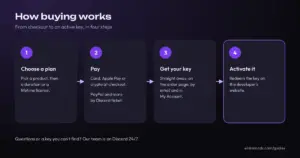
- How buying works at EldroModsPayment methods, instant key delivery, activation with the developer and what our refund policy says, step by step.

 Deutsch
 Français
 Polski
 Español